
Your family’s college shortlist, on one map.
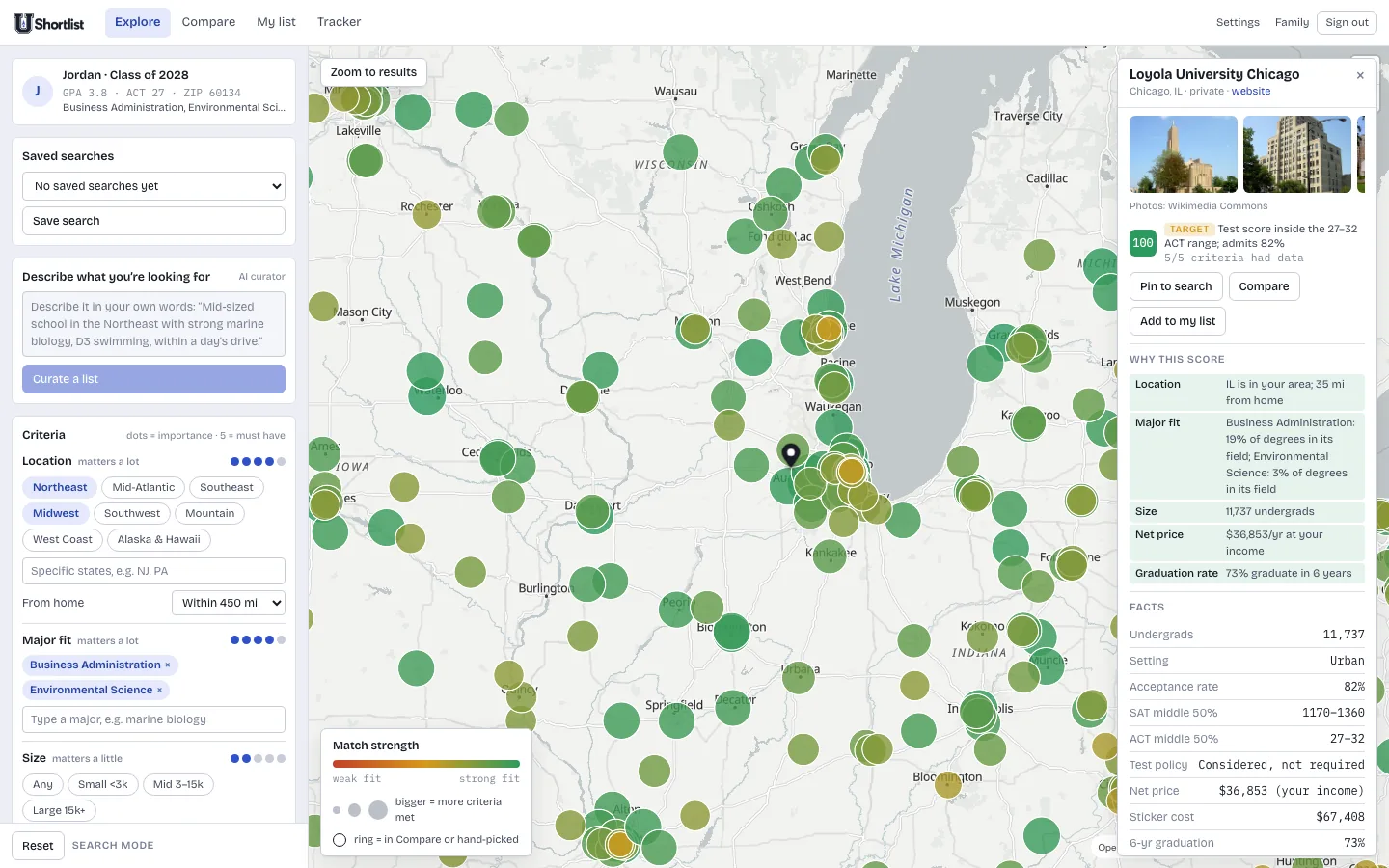
Say what matters and how much. Watch 1,546 four-year colleges light up by fit. See admission odds, the price your family would actually pay, and side-by-side comparisons the whole household can edit.
No sponsored schools. No lead forms. No college ever pays to reach you, and your data stays in your household.
- 1,546
- four-year colleges, every U.S. state
- 10
- criteria you weight yourself
- 5
- income bands for real net price
Built around the conversation a family actually has
Most college sites rank schools for everyone. U Shortlist scores them for one student, against what that student and their parents said matters.
- 01
A map that answers the question
Every college is a circle. Bigger and greener means more of your criteria met. Zoom to the region you care about and the answer is visible before you read a single number.
- 02
Criteria you weight, not a quiz
Distance from home, majors, size, price, setting, graduation rate, your sport and level, Greek life. Give each one to five dots. Five means must-have and becomes a hard filter.
- 03
Odds kept separate from fit
Reach, target or likely, from the student's own scores against each school's middle 50 percent and acceptance rate. A great fit that is a long shot stays honest.
- 04
The price your family would pay
Net price at your income band, with out-of-state tuition added where it applies and regional tuition discounts like WUE taken off. Not the sticker, and not an average for someone else.
- 05
Compare, tab by tab
Admissions, academics, student life, cost and aid, outcomes, and your own notes, side by side. Cells are tinted by how well each fact meets your criteria.
- 06
One household, one list
Parents and the student each sign in with their own account and share the same shortlist, notes, tracker and saved searches. Invite family from Settings with a one-time link.
- 07
Research on demand
Greek life, deadlines, conference and campus vibe are not in public data. Ask for a researched summary with sources; it stays marked until a human checks it.
- 08
Campus photos, real ones
Each school opens with photographs of its actual campus from Wikimedia Commons, not stock images.
Three steps, then it keeps up with you
- 1
Set the profile once
GPA, whichever test scores exist so far, intended majors, home ZIP, and optionally an income band. Update it as scores come in; everything rescores.
- 2
Weight what matters
Pick regions, size, price cap and majors, and say how much each counts. Or describe it in a sentence and let the curator draft the criteria and a seed list.
- 3
Shortlist, compare, track
Pin schools, compare them in tabs, research the ones that stand out, keep notes from visits, and track deadlines through decisions.
Compare us to the big college sites
The large search sites are good at rankings and reviews. They are also funded by colleges: sponsored placements, and selling your interest as a lead. We built the opposite.
| Typical college site | U Shortlist | |
|---|---|---|
| Who the scores are for | Everyone, as a national ranking | One student, against their own criteria |
| Price shown | Sticker price or an overall average | Net price at your income band, out-of-state adjusted |
| Admission odds | Mixed into a match score, or behind a sign-up wall | Shown separately, with the reason, from the student's own scores |
| Business model | Sponsored placements and selling your interest to colleges | A one-time family pass. Colleges cannot buy placement or your details |
| Who else sees your data | Advertisers and partner colleges | Your household and nobody else. Never advertisers, never colleges |
| Family use | One account per student | Parents and student share one household |
Public data, shown plainly
U.S. Department of Education
Acceptance rates, test ranges, net price by income, graduation rates, debt and earnings come from the College Scorecard; school grant aid from IPEDS; varsity teams and roster sizes from the Equity in Athletics survey. All refreshed yearly.
Labelled when a model wrote it
Researched facts such as deadlines and campus life carry a visible “verify” badge and list their sources until someone in your household marks them checked.
Coverage you can predict
Every currently operating, non-profit, four-year U.S. college with at least 300 undergraduates. If a school is missing, it is because the data is, and we will tell you which rule excluded it.
What families ask first
- Is U Shortlist free?
- The core is: the map, odds, net price and every school page, with a short list and one saved search. A one-time family pass unlocks the rest for 18 months, with no subscription and no auto-renewal. See the Terms of use for exactly what is in each.
- Will I see ads?
- Never from a college. No school can pay to be ranked higher, featured, or told who you are, and we never sell or share your information. We may carry clearly labelled ads from services that help families with the process, such as test prep, and they get nothing about you either.
- Do I have to enter our income?
- No. The income band is optional. With it, every school shows the net price for families like yours; without it, the app uses each school's published average net price.
- Who can see my student's profile and notes?
- Only the members of your household, whom you invite yourself, and the people who run the service for support.
- Which colleges are included?
- Every currently operating, non-profit, four-year U.S. college with at least 300 undergraduates, 1,546 in all, including branch campuses that report their own data.
- Does it replace a school counselor?
- No. It gives a family a shared, honest picture to bring to that conversation: what fits, what it costs, and how likely admission is. Counselors know the student; this knows the data.
- How do we get in?
- Sign in with a Google or Apple account. The first person in creates the household and invites the rest of the family from Settings with a one-time link; everyone shares the same list from then on.